> ## Documentation Index
> Fetch the complete documentation index at: https://pricepirate.com/docs/llms.txt
> Use this file to discover all available pages before exploring further.
# Add products
> Add products or collections that PricePirate should track.
You find the **Add products** button at the top right of the [Product settings](/docs/en/guide/catalog/product-settings). Search for individual products and select them, or pick an entire Shopify collection.
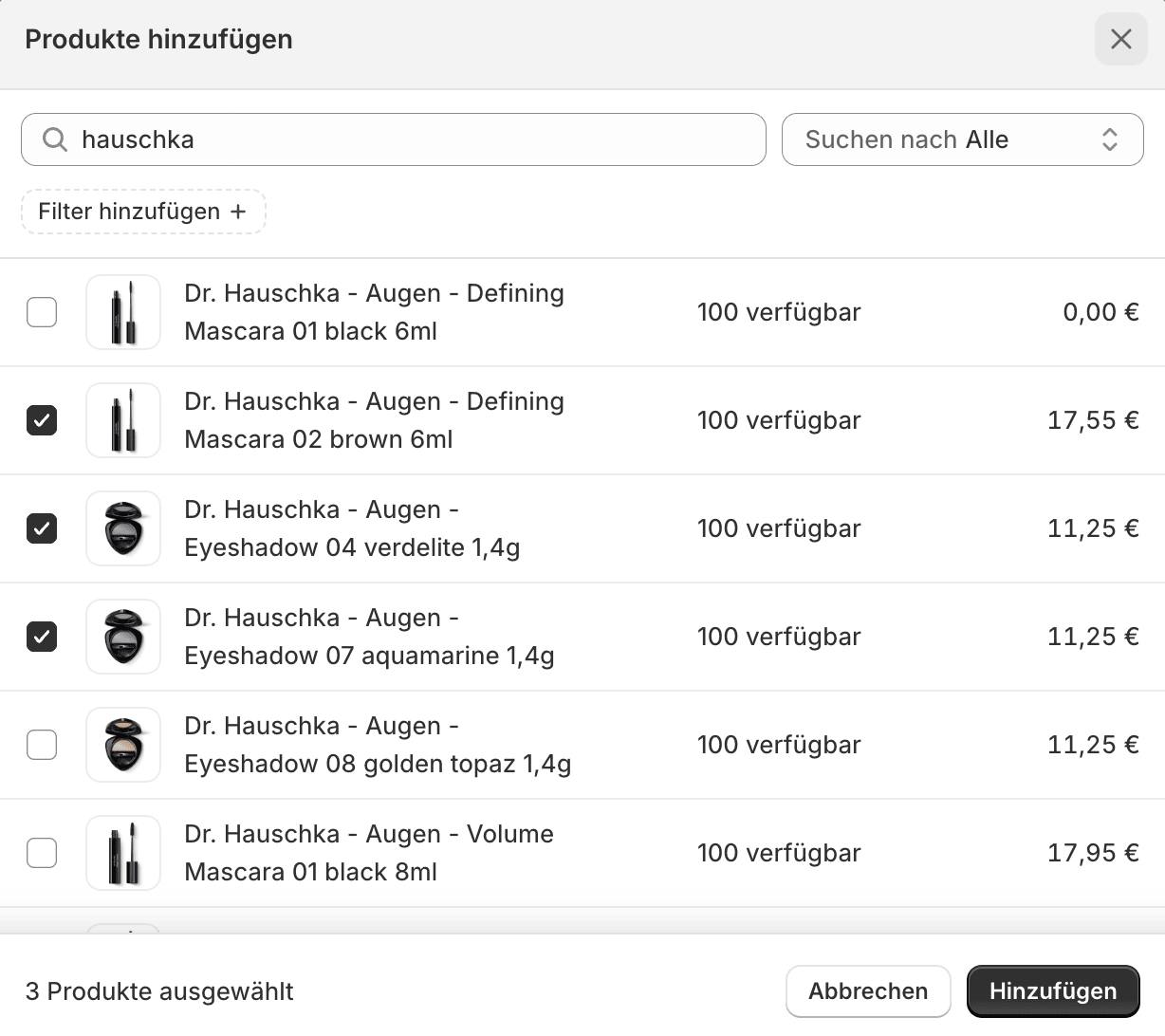 PricePirate creates tracked products for the selected variants. Next, connect a [listing](/docs/en/guide/catalog/connect-listings) and switch on price monitoring in the [Product settings](/docs/en/guide/catalog/product-settings).
## Good selection
* Start with products where marketplace prices matter.
* Check whether variants have clear EAN/GTIN values.
* Use collections when you want to set up many similar products together.
PricePirate creates tracked products for the selected variants. Next, connect a [listing](/docs/en/guide/catalog/connect-listings) and switch on price monitoring in the [Product settings](/docs/en/guide/catalog/product-settings).
## Good selection
* Start with products where marketplace prices matter.
* Check whether variants have clear EAN/GTIN values.
* Use collections when you want to set up many similar products together.