> ## Documentation Index
> Fetch the complete documentation index at: https://pricepirate.com/docs/llms.txt
> Use this file to discover all available pages before exploring further.
# Review and apply price changes
> Review pending price changes and apply them individually or in bulk.
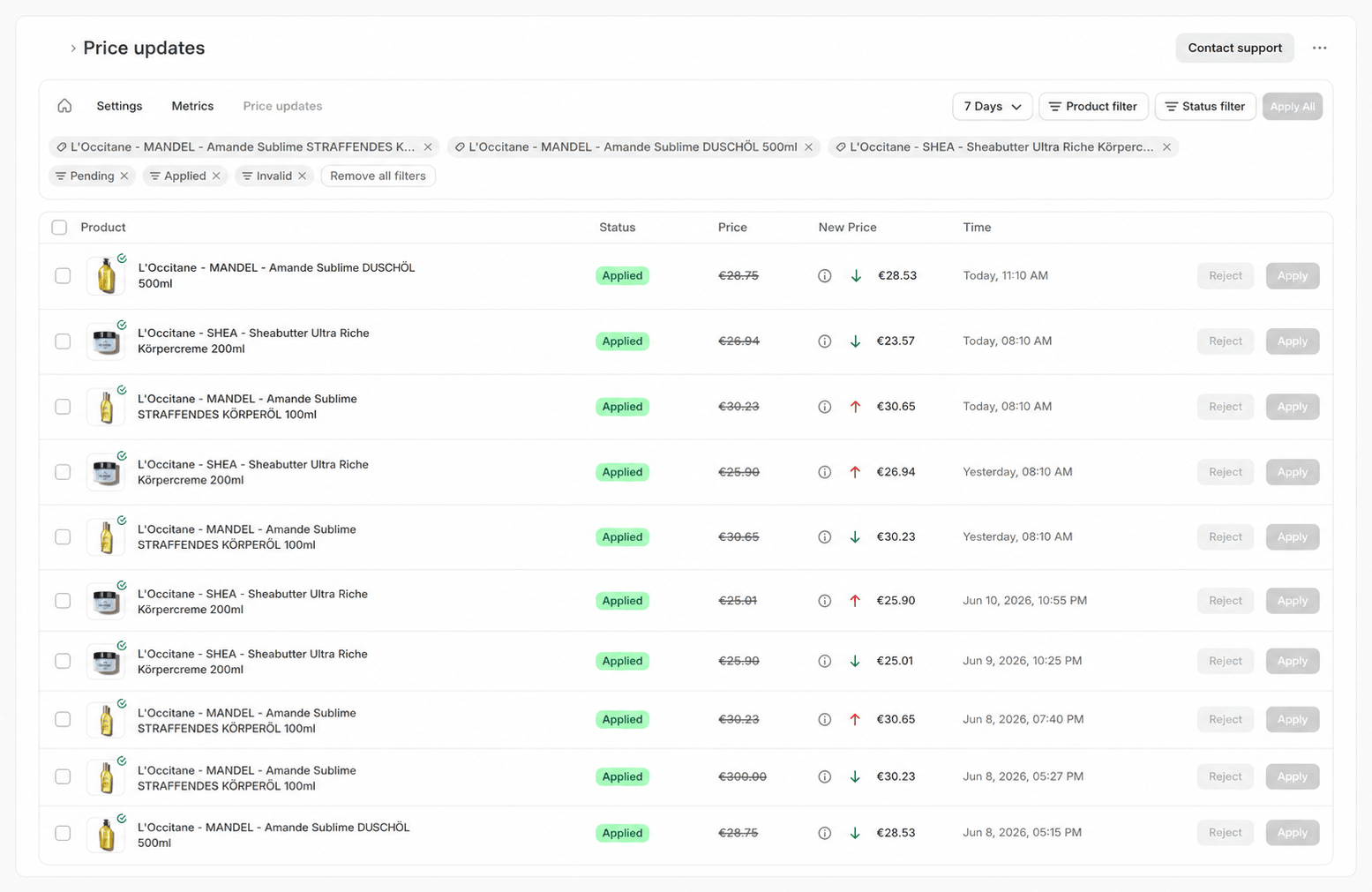
The **Price updates** page collects the price recommendations your [pricing strategies](/docs/en/guide/pricing/strategies) calculate. After every [sync](/docs/en/guide/automation/syncs) and after a strategy change, PricePirate reviews your variants and records each suggested change as **Pending**. Here you review these recommendations and apply them — or let [auto-apply](/docs/en/guide/price-changes/auto-apply) handle them.
The page belongs to the product tab bar **Home · Settings · Metrics · Price updates** and opens from the **Price updates** tab.
 ## The table
Each row represents one suggested price change for a variant.
| Column | Meaning |
| ------------- | ---------------------------------------------------------------------------------------- |
| **Product** | The affected variant, with image and title. |
| **Status** | The current status of the change (see [Status](#status)). |
| **Price** | For pending changes the current price in Shopify, otherwise the price before the change. |
| **New Price** | The suggested price. An up arrow means an increase, a down arrow means a decrease. |
| **Time** | When the change was last updated, shortened to **Today** or **Yesterday**. |
The **Price** of a pending change is live: it shows the price currently set in Shopify, so you can check the recommendation against the real starting value. When an info icon sits next to the new price, a tooltip shows the strategy's reason for the recommendation.
Pending changes always appear at the top, followed by the remaining rows in descending order of their last update.
For variants with [dynamic discounts](/docs/en/guide/pricing/dynamic-discounts), the row shows the regular price as the new price and, next to it, a clickable **discount chip** with the discount amount. Use the chip to view, copy, or delete the discount.
## Status
Each price change has exactly one of these six statuses:
| Status | Meaning |
| ------------- | ------------------------------------------------------------------------------------------------------------------------------------------------------------------------------------------------------------------------------------------------------------------------------------------------------------------------------------------------------------------- |
| **Pending** | The strategy suggested a price that differs from the current one. The change is waiting to be applied — manually or by auto-apply. |
| **Applied** | The change was written to your Shopify product. |
| **Rejected** | You rejected the change here manually. |
| **Error** | An internal error occurred while calculating or applying the change. A support button appears in the row. |
| **Invalid** | The strategy could not determine a valid price, for example because required data was missing or the [market for price changes](/docs/en/guide/account/settings) (shop default or the variant's override) has no connected listing. The row's tooltip names the reason. If the entry is less than 24 hours old and the variant is active, recalculate it with **Rerun**. |
| **Unchanged** | The strategy succeeded, but the suggested price matched the current price. |
The "market not connected" reason appears after interactive recalculations, for example after a strategy change, activating a variant, or a manual **Rerun**, not from the routine synchronizations.
## Filtering
The table can be narrowed with four controls:
| Control | Effect |
| ---------------------- | --------------------------------------------------------------------------------------------------------------------------------------------------------------------------- |
| **Time Range** | Switches between **24 Hours**, **7 Days**, **30 Days**, and **90 Days** (default: **7 Days**) and filters by a change's last update. |
| **Product filter** | Limits the table to selected products or one collection. Active filters appear as chips above the table. |
| **Status filter** | Shows or hides individual statuses. The default view shows **Pending**, **Applied**, and **Invalid**; you can additionally show **Rejected**, **Error**, and **Unchanged**. |
| **Remove all filters** | Resets the product and status filters. |
## Applying and rejecting
Every pending row offers **Apply** and **Reject**. **Apply** writes the new price to Shopify, **Reject** discards the recommendation. Both actions exist only for pending changes. **Apply** is disabled when the new price already matches the current price. If the write to Shopify fails, the row takes the status **Error**.
**Apply All** in the top right applies every pending change in the current view — that is, within the selected time range and product filter. The button is active only when the view contains pending changes.
## Selection and navigation
Use the checkboxes to select multiple rows. The selection bar then offers:
* **Apply** and **Reject** for all selected pending changes.
* **Filter** limits the page to the products in your selection.
* The **Navigation** menu jumps with your selection to [Product settings](/docs/en/guide/catalog/product-settings), [Metrics](/docs/en/guide/insights/metrics), the [reports](/docs/en/guide/reports/overview), or the product in the Shopify admin.
To automate this review entirely, see [Auto-apply](/docs/en/guide/price-changes/auto-apply).
## The table
Each row represents one suggested price change for a variant.
| Column | Meaning |
| ------------- | ---------------------------------------------------------------------------------------- |
| **Product** | The affected variant, with image and title. |
| **Status** | The current status of the change (see [Status](#status)). |
| **Price** | For pending changes the current price in Shopify, otherwise the price before the change. |
| **New Price** | The suggested price. An up arrow means an increase, a down arrow means a decrease. |
| **Time** | When the change was last updated, shortened to **Today** or **Yesterday**. |
The **Price** of a pending change is live: it shows the price currently set in Shopify, so you can check the recommendation against the real starting value. When an info icon sits next to the new price, a tooltip shows the strategy's reason for the recommendation.
Pending changes always appear at the top, followed by the remaining rows in descending order of their last update.
For variants with [dynamic discounts](/docs/en/guide/pricing/dynamic-discounts), the row shows the regular price as the new price and, next to it, a clickable **discount chip** with the discount amount. Use the chip to view, copy, or delete the discount.
## Status
Each price change has exactly one of these six statuses:
| Status | Meaning |
| ------------- | ------------------------------------------------------------------------------------------------------------------------------------------------------------------------------------------------------------------------------------------------------------------------------------------------------------------------------------------------------------------- |
| **Pending** | The strategy suggested a price that differs from the current one. The change is waiting to be applied — manually or by auto-apply. |
| **Applied** | The change was written to your Shopify product. |
| **Rejected** | You rejected the change here manually. |
| **Error** | An internal error occurred while calculating or applying the change. A support button appears in the row. |
| **Invalid** | The strategy could not determine a valid price, for example because required data was missing or the [market for price changes](/docs/en/guide/account/settings) (shop default or the variant's override) has no connected listing. The row's tooltip names the reason. If the entry is less than 24 hours old and the variant is active, recalculate it with **Rerun**. |
| **Unchanged** | The strategy succeeded, but the suggested price matched the current price. |
The "market not connected" reason appears after interactive recalculations, for example after a strategy change, activating a variant, or a manual **Rerun**, not from the routine synchronizations.
## Filtering
The table can be narrowed with four controls:
| Control | Effect |
| ---------------------- | --------------------------------------------------------------------------------------------------------------------------------------------------------------------------- |
| **Time Range** | Switches between **24 Hours**, **7 Days**, **30 Days**, and **90 Days** (default: **7 Days**) and filters by a change's last update. |
| **Product filter** | Limits the table to selected products or one collection. Active filters appear as chips above the table. |
| **Status filter** | Shows or hides individual statuses. The default view shows **Pending**, **Applied**, and **Invalid**; you can additionally show **Rejected**, **Error**, and **Unchanged**. |
| **Remove all filters** | Resets the product and status filters. |
## Applying and rejecting
Every pending row offers **Apply** and **Reject**. **Apply** writes the new price to Shopify, **Reject** discards the recommendation. Both actions exist only for pending changes. **Apply** is disabled when the new price already matches the current price. If the write to Shopify fails, the row takes the status **Error**.
**Apply All** in the top right applies every pending change in the current view — that is, within the selected time range and product filter. The button is active only when the view contains pending changes.
## Selection and navigation
Use the checkboxes to select multiple rows. The selection bar then offers:
* **Apply** and **Reject** for all selected pending changes.
* **Filter** limits the page to the products in your selection.
* The **Navigation** menu jumps with your selection to [Product settings](/docs/en/guide/catalog/product-settings), [Metrics](/docs/en/guide/insights/metrics), the [reports](/docs/en/guide/reports/overview), or the product in the Shopify admin.
To automate this review entirely, see [Auto-apply](/docs/en/guide/price-changes/auto-apply).