> ## Documentation Index
> Fetch the complete documentation index at: https://pricepirate.com/docs/llms.txt
> Use this file to discover all available pages before exploring further.
# Competitors
> Who appears on your listings, how often these competitors take rank 1, and how often they undercut you.
The **Competitors** tab answers one question: who are my competitors and how often do they undercut me? It lists every shop that appeared on the same listings as you within the selected [time window](/docs/en/guide/reports/overview#filter-and-time-window).
 ## The competitor table
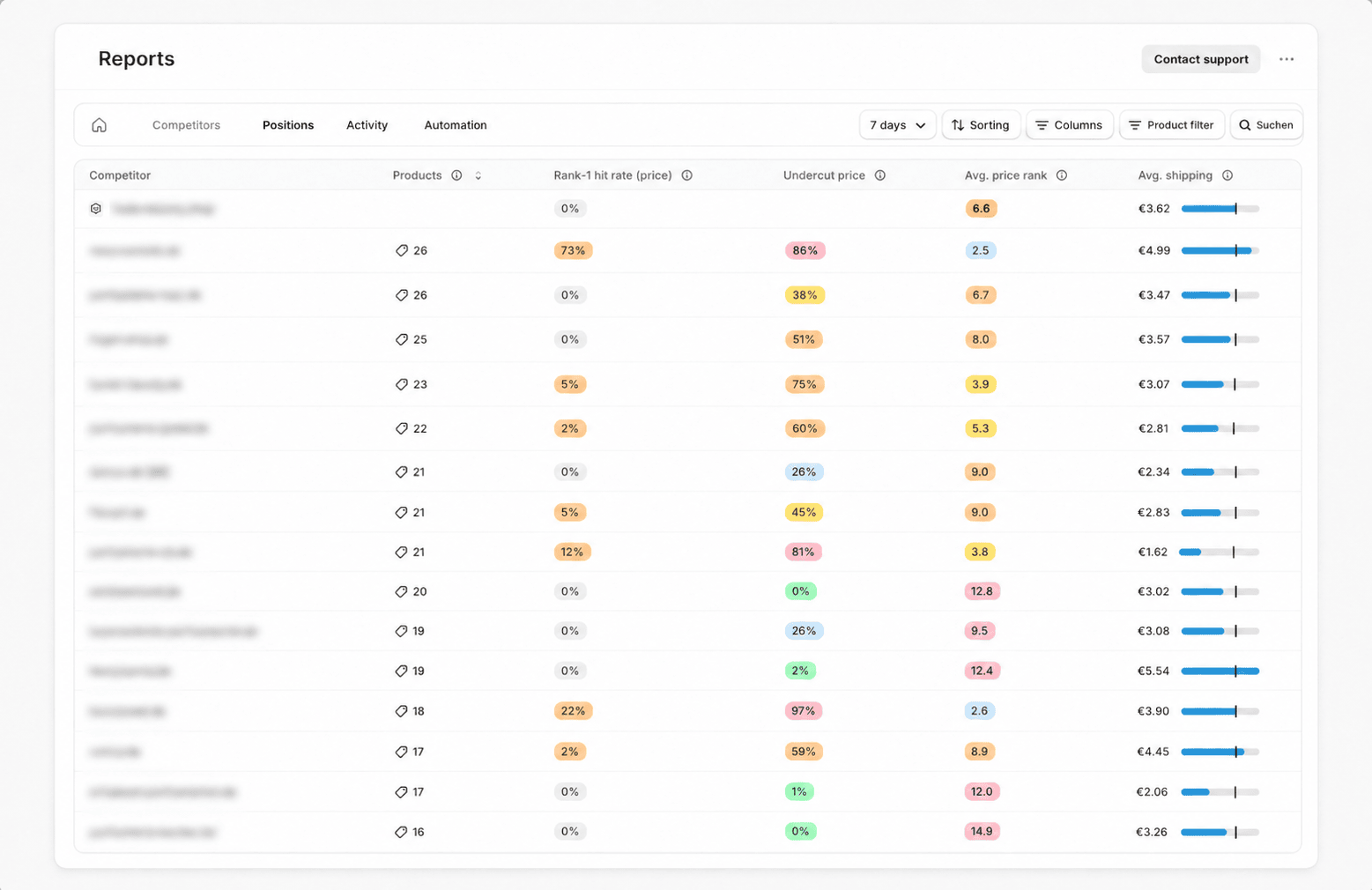
Each row represents one competitor shop. Your own shop is pinned on top as a reference, marked with a shop icon and your shop name (or **Own shop** as a fallback). All metrics refer to the **measurements** taken in the window — the regular marketplace snapshots of your [listings](/docs/en/guide/concepts/listings-and-offers).
The table offers these columns. Columns marked "(hidden by default)" can be shown via the **Columns** button.
| Column | Meaning |
| --------------------------- | --------------------------------------------------------------------------------------------------------------------------------------------------------------------------------------------------------- |
| **Shared listings** | Number of products where this competitor appears on the same listing. Short label: **Products**. |
| **Rank-1 hit rate (price)** | Of the measurements in which this competitor offered, the share where they ranked first by product price excluding shipping. For your own row, the share of measurements where your own offer was rank 1. |
| **Rank-1 hit rate (total)** | Like the price version, but by total price including shipping. (hidden by default) |
| **Undercut share price** | Share of measurements where this competitor's cheapest product price was below your own product price. Short label: **Undercut price**. |
| **Undercut share total** | Share of measurements where this competitor's cheapest total price was below your own total price. Short label: **Undercut total**. (hidden by default) |
| **Avg. price rank** | Average rank of this competitor by product price excluding shipping in the selected window. Lower is better. |
| **Avg. total rank** | Average rank by total price including shipping. Lower is better. (hidden by default) |
| **Avg. shipping** | Average shipping cost for this competitor in the selected window, drawn as a bar with your own shipping shown as a reference marker. |
Your own row leaves **Shared listings** and **Undercut share** blank, because those metrics describe the comparison against you. **Rank-1 hit rate** and **Avg. price rank** (and their total-price counterparts), however, show your own values in the own row.
The number in the **Shared listings** column is a button. Clicking it opens the [product metrics](/docs/en/guide/insights/metrics), filtered to exactly the products you share with this competitor.
While no measurements exist for the window yet, you see the note *"No competitor data available for this time window yet."* The table fills up once the first [syncs](/docs/en/guide/automation/syncs) complete.
## Sorting, columns, and search
Three controls are available only on the **Competitors** tab:
* **Sorting** opens a menu with **Sort by** (column) and **Order** (ascending or descending). Clicking a column header also sorts by that column.
* **Columns** shows or hides individual columns, including the total-price columns that are hidden by default.
* **Search** filters the table by **Shop name**. The active search appears as a removable chip above the table.
## What you can do
A competitor with a high **undercut share** on products you share is a signal: use the **Shared listings** button to open the affected products and review their [floor price and settings](/docs/en/guide/pricing/settings) as well as the chosen [pricing strategy](/docs/en/guide/pricing/strategies). If the **Avg. shipping** differs markedly from your own, look at the **Rank-1 hit rate (total)** and **Undercut share total** columns, since the [total price including shipping](/docs/en/guide/concepts/total-price) often paints a different picture than the product price alone.
## The competitor table
Each row represents one competitor shop. Your own shop is pinned on top as a reference, marked with a shop icon and your shop name (or **Own shop** as a fallback). All metrics refer to the **measurements** taken in the window — the regular marketplace snapshots of your [listings](/docs/en/guide/concepts/listings-and-offers).
The table offers these columns. Columns marked "(hidden by default)" can be shown via the **Columns** button.
| Column | Meaning |
| --------------------------- | --------------------------------------------------------------------------------------------------------------------------------------------------------------------------------------------------------- |
| **Shared listings** | Number of products where this competitor appears on the same listing. Short label: **Products**. |
| **Rank-1 hit rate (price)** | Of the measurements in which this competitor offered, the share where they ranked first by product price excluding shipping. For your own row, the share of measurements where your own offer was rank 1. |
| **Rank-1 hit rate (total)** | Like the price version, but by total price including shipping. (hidden by default) |
| **Undercut share price** | Share of measurements where this competitor's cheapest product price was below your own product price. Short label: **Undercut price**. |
| **Undercut share total** | Share of measurements where this competitor's cheapest total price was below your own total price. Short label: **Undercut total**. (hidden by default) |
| **Avg. price rank** | Average rank of this competitor by product price excluding shipping in the selected window. Lower is better. |
| **Avg. total rank** | Average rank by total price including shipping. Lower is better. (hidden by default) |
| **Avg. shipping** | Average shipping cost for this competitor in the selected window, drawn as a bar with your own shipping shown as a reference marker. |
Your own row leaves **Shared listings** and **Undercut share** blank, because those metrics describe the comparison against you. **Rank-1 hit rate** and **Avg. price rank** (and their total-price counterparts), however, show your own values in the own row.
The number in the **Shared listings** column is a button. Clicking it opens the [product metrics](/docs/en/guide/insights/metrics), filtered to exactly the products you share with this competitor.
While no measurements exist for the window yet, you see the note *"No competitor data available for this time window yet."* The table fills up once the first [syncs](/docs/en/guide/automation/syncs) complete.
## Sorting, columns, and search
Three controls are available only on the **Competitors** tab:
* **Sorting** opens a menu with **Sort by** (column) and **Order** (ascending or descending). Clicking a column header also sorts by that column.
* **Columns** shows or hides individual columns, including the total-price columns that are hidden by default.
* **Search** filters the table by **Shop name**. The active search appears as a removable chip above the table.
## What you can do
A competitor with a high **undercut share** on products you share is a signal: use the **Shared listings** button to open the affected products and review their [floor price and settings](/docs/en/guide/pricing/settings) as well as the chosen [pricing strategy](/docs/en/guide/pricing/strategies). If the **Avg. shipping** differs markedly from your own, look at the **Rank-1 hit rate (total)** and **Undercut share total** columns, since the [total price including shipping](/docs/en/guide/concepts/total-price) often paints a different picture than the product price alone.