> ## Documentation Index
> Fetch the complete documentation index at: https://pricepirate.com/docs/llms.txt
> Use this file to discover all available pages before exploring further.
# Dynamic Pricing Software
> Dynamic pricing software for Shopify: automated pricing with competitor-based strategies, guardrails, and price changes you review or auto-apply.
Dynamic pricing software recalculates your selling prices continuously instead of leaving them fixed. PricePirate brings automated pricing to Shopify merchants — with competitor-based strategies, hard guardrails, and price changes you review manually or let apply automatically.
Describe your pricing logic. We will show how PricePirate maps it.
## What dynamic pricing software does
Dynamic pricing is the umbrella term for automated price adjustment: software recalculates prices based on competitor offers, demand, inventory, or other signals. In the marketplace context, the variant that pays off first is competitor-based repricing — your price follows defined rules relative to your competitors' offers.
The payoff is concrete: on comparison shopping sites, your price position decides your clicks. Static prices are either too expensive (visibility lost) or too cheap (margin given away) — usually both, just at different times.
## How PricePirate automates pricing
PricePirate measures your connected marketplace listings several times a day and records every competitor offer with price, shipping, and total price.
The strategy defines the reaction: match the cheapest competitor or undercut them by a fixed amount — by item price or by total price including shipping.
Minimum price or minimum margin, maximum price, and minimum stock bound every suggestion. Invalid results are never applied.
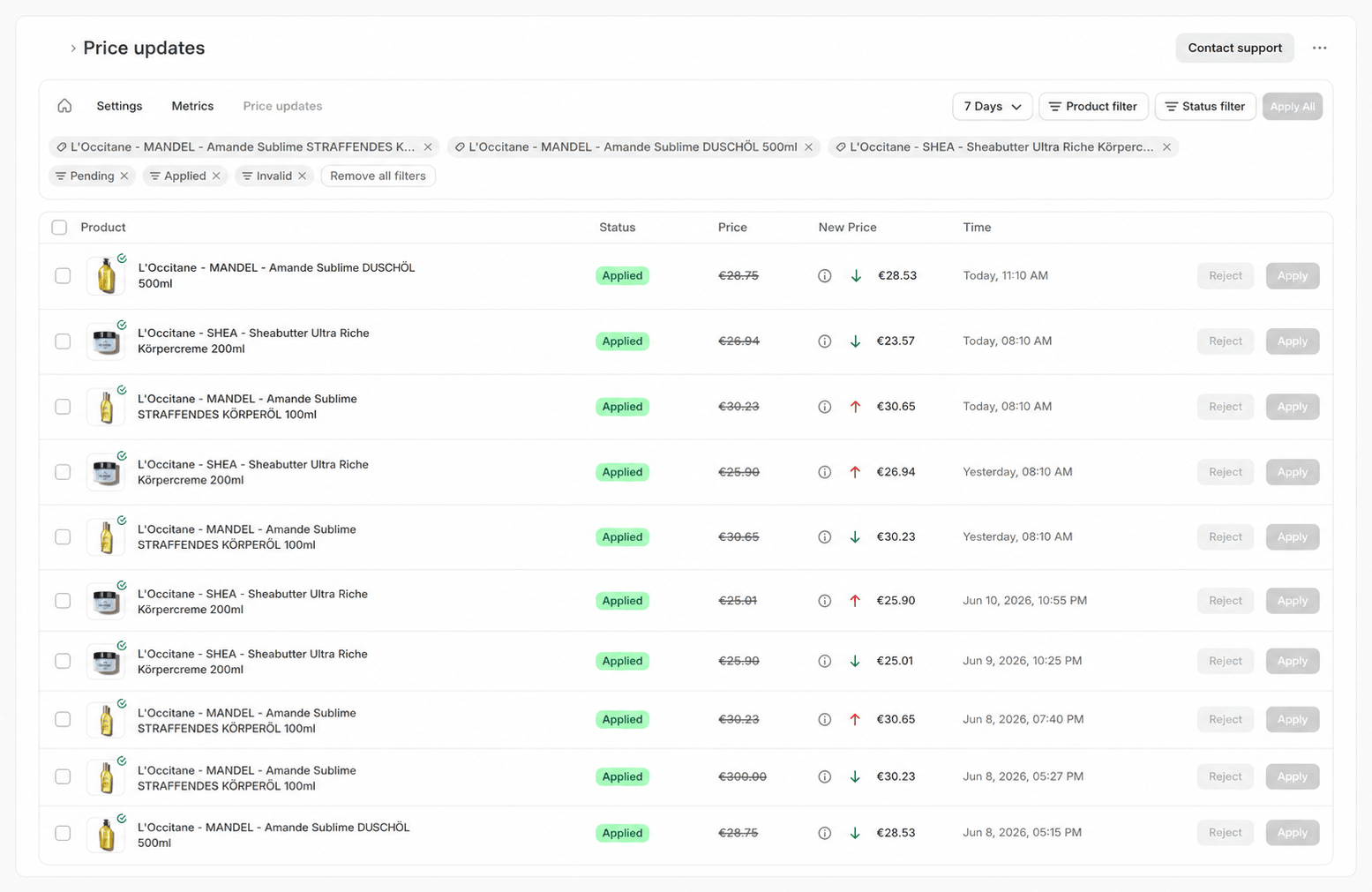
Suggestions land as pending price changes in the review queue. You decide manually — or enable [auto-apply](/docs/en/guide/price-changes/auto-apply) once the strategy is tested. Accepted prices are written straight to Shopify.
 ## Price automation patterns that work
Automated pricing only works when the rules match your position in the market. Three patterns have proven themselves:
* **Defend visibility:** match the cheapest competitor without undercutting. You stay near the front without starting a price war — right for assortments with stable margins.
* **Take position one:** undercut the cheapest competitor by a fixed amount. Right for products where the top spot drives sales — always with a price floor.
* **Protect margin:** with a [minimum margin](/docs/en/guide/pricing/min-margin), PricePirate calculates the price floor from your costs. The strategy only competes where it pays.
With [reset windows](/docs/en/guide/pricing/reset-windows), prices return to your base value at fixed times — automation, but only when you want it.
## A dynamic pricing tool with guardrails, not a black box
Price automation does not mean being the cheapest at all costs. It means setting the best defensible price for every market situation:
* The **minimum price** (or the calculated margin floor) is never crossed.
* The **maximum price** is never exceeded — even when the competition gets more expensive.
* The **minimum stock** threshold pauses price changes when inventory runs low.
* **Ignored shops** exclude sellers you do not want to compete with.
Before activating anything, you [test every strategy](/docs/en/guide/pricing/test) against live listing data and see exactly which price it would suggest.
## Shopify dynamic pricing
PricePirate is a Shopify app: price changes are written directly to your Shopify products, and your store stays the single source of truth for prices. Through your existing feed connections, the prices flow onward into channels like Idealo. [Templates](/docs/en/guide/pricing/templates) roll a proven pricing logic out to many products at once, and every applied change stays traceable in the log.
## FAQ
Yes. Setting prices freely and adjusting them to the competition is the core of competition itself. The limits come from antitrust law (no price fixing with competitors) and consumer law — for example, rules on how reference prices may be displayed.
Repricing is the competitor-based variant of dynamic pricing: your price follows rules relative to competitor offers. Dynamic pricing also covers demand, inventory, or time-based adjustments. PricePirate specializes in competitor-based repricing — see [repricing software](/docs/en/solutions/repricing-software).
No. Every strategy works inside your guardrails, and suggestions outside them are never applied. You start with manual review, enable auto-apply once the strategy is tested — and can switch it off at any time.
Competitor-based strategies need offers to compare against. On listings without competitors, your price stays unchanged — and monitoring tells you as soon as that changes.
Pricing depends on the number of monitored products and the measurement frequency. You can find the current plans on the [pricing page](https://pricepirate.com/en#pricing).
Describe your pricing logic. We will show how PricePirate maps it.
## Next steps in the guide
* [Set up pricing strategies](/docs/en/guide/pricing/strategies)
* [Strategy settings and guardrails](/docs/en/guide/pricing/settings)
* [Templates for many products](/docs/en/guide/pricing/templates)
* [Test strategies](/docs/en/guide/pricing/test)
## Price automation patterns that work
Automated pricing only works when the rules match your position in the market. Three patterns have proven themselves:
* **Defend visibility:** match the cheapest competitor without undercutting. You stay near the front without starting a price war — right for assortments with stable margins.
* **Take position one:** undercut the cheapest competitor by a fixed amount. Right for products where the top spot drives sales — always with a price floor.
* **Protect margin:** with a [minimum margin](/docs/en/guide/pricing/min-margin), PricePirate calculates the price floor from your costs. The strategy only competes where it pays.
With [reset windows](/docs/en/guide/pricing/reset-windows), prices return to your base value at fixed times — automation, but only when you want it.
## A dynamic pricing tool with guardrails, not a black box
Price automation does not mean being the cheapest at all costs. It means setting the best defensible price for every market situation:
* The **minimum price** (or the calculated margin floor) is never crossed.
* The **maximum price** is never exceeded — even when the competition gets more expensive.
* The **minimum stock** threshold pauses price changes when inventory runs low.
* **Ignored shops** exclude sellers you do not want to compete with.
Before activating anything, you [test every strategy](/docs/en/guide/pricing/test) against live listing data and see exactly which price it would suggest.
## Shopify dynamic pricing
PricePirate is a Shopify app: price changes are written directly to your Shopify products, and your store stays the single source of truth for prices. Through your existing feed connections, the prices flow onward into channels like Idealo. [Templates](/docs/en/guide/pricing/templates) roll a proven pricing logic out to many products at once, and every applied change stays traceable in the log.
## FAQ
Yes. Setting prices freely and adjusting them to the competition is the core of competition itself. The limits come from antitrust law (no price fixing with competitors) and consumer law — for example, rules on how reference prices may be displayed.
Repricing is the competitor-based variant of dynamic pricing: your price follows rules relative to competitor offers. Dynamic pricing also covers demand, inventory, or time-based adjustments. PricePirate specializes in competitor-based repricing — see [repricing software](/docs/en/solutions/repricing-software).
No. Every strategy works inside your guardrails, and suggestions outside them are never applied. You start with manual review, enable auto-apply once the strategy is tested — and can switch it off at any time.
Competitor-based strategies need offers to compare against. On listings without competitors, your price stays unchanged — and monitoring tells you as soon as that changes.
Pricing depends on the number of monitored products and the measurement frequency. You can find the current plans on the [pricing page](https://pricepirate.com/en#pricing).
Describe your pricing logic. We will show how PricePirate maps it.
## Next steps in the guide
* [Set up pricing strategies](/docs/en/guide/pricing/strategies)
* [Strategy settings and guardrails](/docs/en/guide/pricing/settings)
* [Templates for many products](/docs/en/guide/pricing/templates)
* [Test strategies](/docs/en/guide/pricing/test)