> ## Documentation Index
> Fetch the complete documentation index at: https://pricepirate.com/docs/llms.txt
> Use this file to discover all available pages before exploring further.
# Idealo Repricing for Shopify Merchants
> Idealo repricing for Shopify merchants selling into Germany and Austria: monitor competitor offers, control your total-price position, and automate price changes with guardrails.
Idealo is the price comparison site German shoppers check before they buy — and for international Shopify merchants selling into Germany or Austria, it is one of the most effective acquisition channels. Idealo repricing means your prices react automatically to the competition there: PricePirate monitors your Idealo listings, calculates price suggestions from your rules, and writes them to your Shopify store.
Start with the lead form. We will check your Idealo setup and follow up with the next steps.
## How Idealo works — for non-German sellers
If you are new to the German market, three things matter:
* **Idealo is a price comparison site, not a marketplace.** Merchants list their offers via a product data feed; shoppers compare offers per product and click through to the merchant's store (or buy directly on Idealo via its checkout program, called *Direktkauf*).
* **Sorting is by product price.** Idealo's default ranking uses the **item price**, not the total. Separately, Idealo highlights the offer with the cheapest **total price including shipping** — so a low item price with expensive shipping can lose that highlight to a pricier offer with free shipping.
* **The top positions get the clicks.** Offers buried below the first few positions are practically invisible. On competitive listings, the cheapest price changes several times a day.
That combination — tight price ranking plus fast-moving competition — is why static prices underperform on Idealo. PricePirate tracks both the [item price and the total price](/docs/en/guide/concepts/total-price) and shows you a separate rank for each.
## How Idealo repricing works with PricePirate
You connect each Shopify product to its Idealo listing — automatically via EAN/GTIN, by Idealo URL, or through search. PricePirate then measures the listing on a regular schedule and records every competitor offer with price, shipping, and total price.
Per variant, you choose a strategy: match the cheapest competitor or undercut them by a fixed amount — based on the item price or the total price, whichever you want to compete on.
After each measurement, PricePirate creates pending price changes. Review them manually, or enable [auto-apply](/docs/en/guide/price-changes/auto-apply) once your strategy and guardrails are tested.
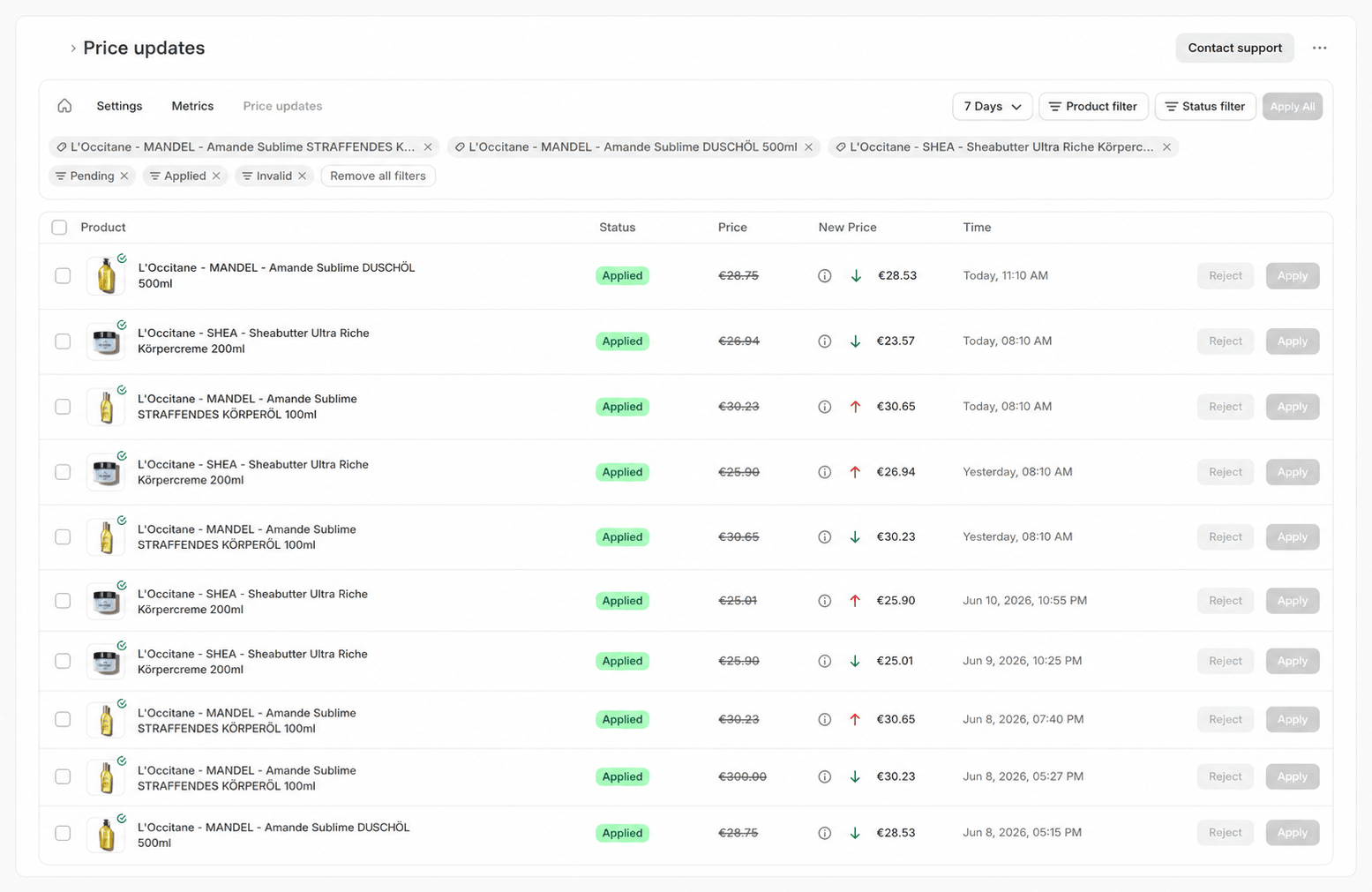 Accepted changes are written directly to your Shopify products. Idealo picks up the new prices through your existing feed connection with its next data import.
## Why repricing through Shopify
PricePirate is a Shopify app — price changes run through your store, not around it:
* **One price source.** Your Shopify price stays authoritative. Your store, your Idealo feed, and every other connected channel show the same price — no drift between platform and shop.
* **No extra interface to maintain.** You do not need a custom Idealo integration for repricing. PricePirate reads competitor data straight from the Idealo listing and writes new prices to Shopify; your existing feed connection carries them onward.
This also holds for **Direktkauf**: if you sell through Idealo's checkout, the same feed prices apply — a competitive total-price position remains the foundation.
## Guardrails: price floors and margins
Automated repricing needs limits, or competitiveness turns into a margin problem. Every PricePirate strategy enforces:
* A **minimum price** that is never crossed — as a fixed value or as a [minimum margin](/docs/en/guide/pricing/min-margin) calculated from your costs.
* A **maximum price** that caps upward moves.
* A **minimum stock** threshold that pauses price changes when inventory runs low.
* **Ignored shops** — exclude specific competitors, such as grey-market sellers, from the comparison.
Suggestions outside the limits are flagged invalid and never applied. Every applied change stays visible in the log.
## FAQ
PricePirate writes new prices to Shopify immediately. When they appear on Idealo depends on how often Idealo imports your product data — that is determined by your feed setup, not by PricePirate.
Direktkauf is Idealo's on-site checkout: shoppers complete the purchase on Idealo instead of being redirected to your store. For repricing, nothing changes — your feed prices apply, and the total-price position still drives visibility.
PricePirate is a Shopify app and works with your existing store. What you need for Idealo itself is a merchant account and a product feed for the German or Austrian market.
An EAN/GTIN makes the match to the Idealo listing unambiguous and enables automatic connecting. Alternatively, connect listings by Idealo URL or via search.
Pricing depends on the number of monitored products and the measurement frequency. You can find the current plans on the [pricing page](https://pricepirate.com/en#pricing).
Tell us about your store and your Idealo category. We will show you the right setup.
## Next steps in the guide
* [Connect listings](/docs/en/guide/catalog/connect-listings)
* [Price vs. total price](/docs/en/guide/concepts/total-price)
* [Auto-apply price changes](/docs/en/guide/price-changes/auto-apply)
* [Repricing software overview](/docs/en/solutions/repricing-software)
Want to go lower on Idealo without cutting your regular shop price? That is what [dynamic discounts](/docs/en/solutions/dynamic-discounts) are for.
Want Idealo price data inside your own systems instead? See the [Idealo API](/docs/en/solutions/idealo-api).
Accepted changes are written directly to your Shopify products. Idealo picks up the new prices through your existing feed connection with its next data import.
## Why repricing through Shopify
PricePirate is a Shopify app — price changes run through your store, not around it:
* **One price source.** Your Shopify price stays authoritative. Your store, your Idealo feed, and every other connected channel show the same price — no drift between platform and shop.
* **No extra interface to maintain.** You do not need a custom Idealo integration for repricing. PricePirate reads competitor data straight from the Idealo listing and writes new prices to Shopify; your existing feed connection carries them onward.
This also holds for **Direktkauf**: if you sell through Idealo's checkout, the same feed prices apply — a competitive total-price position remains the foundation.
## Guardrails: price floors and margins
Automated repricing needs limits, or competitiveness turns into a margin problem. Every PricePirate strategy enforces:
* A **minimum price** that is never crossed — as a fixed value or as a [minimum margin](/docs/en/guide/pricing/min-margin) calculated from your costs.
* A **maximum price** that caps upward moves.
* A **minimum stock** threshold that pauses price changes when inventory runs low.
* **Ignored shops** — exclude specific competitors, such as grey-market sellers, from the comparison.
Suggestions outside the limits are flagged invalid and never applied. Every applied change stays visible in the log.
## FAQ
PricePirate writes new prices to Shopify immediately. When they appear on Idealo depends on how often Idealo imports your product data — that is determined by your feed setup, not by PricePirate.
Direktkauf is Idealo's on-site checkout: shoppers complete the purchase on Idealo instead of being redirected to your store. For repricing, nothing changes — your feed prices apply, and the total-price position still drives visibility.
PricePirate is a Shopify app and works with your existing store. What you need for Idealo itself is a merchant account and a product feed for the German or Austrian market.
An EAN/GTIN makes the match to the Idealo listing unambiguous and enables automatic connecting. Alternatively, connect listings by Idealo URL or via search.
Pricing depends on the number of monitored products and the measurement frequency. You can find the current plans on the [pricing page](https://pricepirate.com/en#pricing).
Tell us about your store and your Idealo category. We will show you the right setup.
## Next steps in the guide
* [Connect listings](/docs/en/guide/catalog/connect-listings)
* [Price vs. total price](/docs/en/guide/concepts/total-price)
* [Auto-apply price changes](/docs/en/guide/price-changes/auto-apply)
* [Repricing software overview](/docs/en/solutions/repricing-software)
Want to go lower on Idealo without cutting your regular shop price? That is what [dynamic discounts](/docs/en/solutions/dynamic-discounts) are for.
Want Idealo price data inside your own systems instead? See the [Idealo API](/docs/en/solutions/idealo-api).