> ## Documentation Index
> Fetch the complete documentation index at: https://pricepirate.com/docs/llms.txt
> Use this file to discover all available pages before exploring further.
# Competitor Price Monitoring Software
> Competitor price monitoring for Shopify merchants: track competitor prices, total prices, and positions on comparison shopping sites automatically.
Competitor price monitoring means you always know where your offers stand in the market — without checking listings by hand. PricePirate connects your Shopify products to marketplace listings, measures them several times a day, and shows you competitor prices, total prices, and your position per product.
Send us your requirements. We will check the matching marketplaces and data sources.
## Why manual price checking fails
Marketplace prices change constantly — on competitive listings, several times a day. If you check prices manually, you see changes too late: either your offer slips down the ranking unnoticed and loses visibility, or it stays cheaper than necessary and gives away margin. Beyond a few dozen products, manual checking simply stops being feasible.
## Competitor price tracking on a schedule
PricePirate measures every connected listing on a regular schedule — you decide how often, per listing. Each measurement records every visible offer with item price, shipping cost, and total price. The results appear in the product metrics: one row per product, with current values, averages, and sparklines over 7, 14, or 30 days.
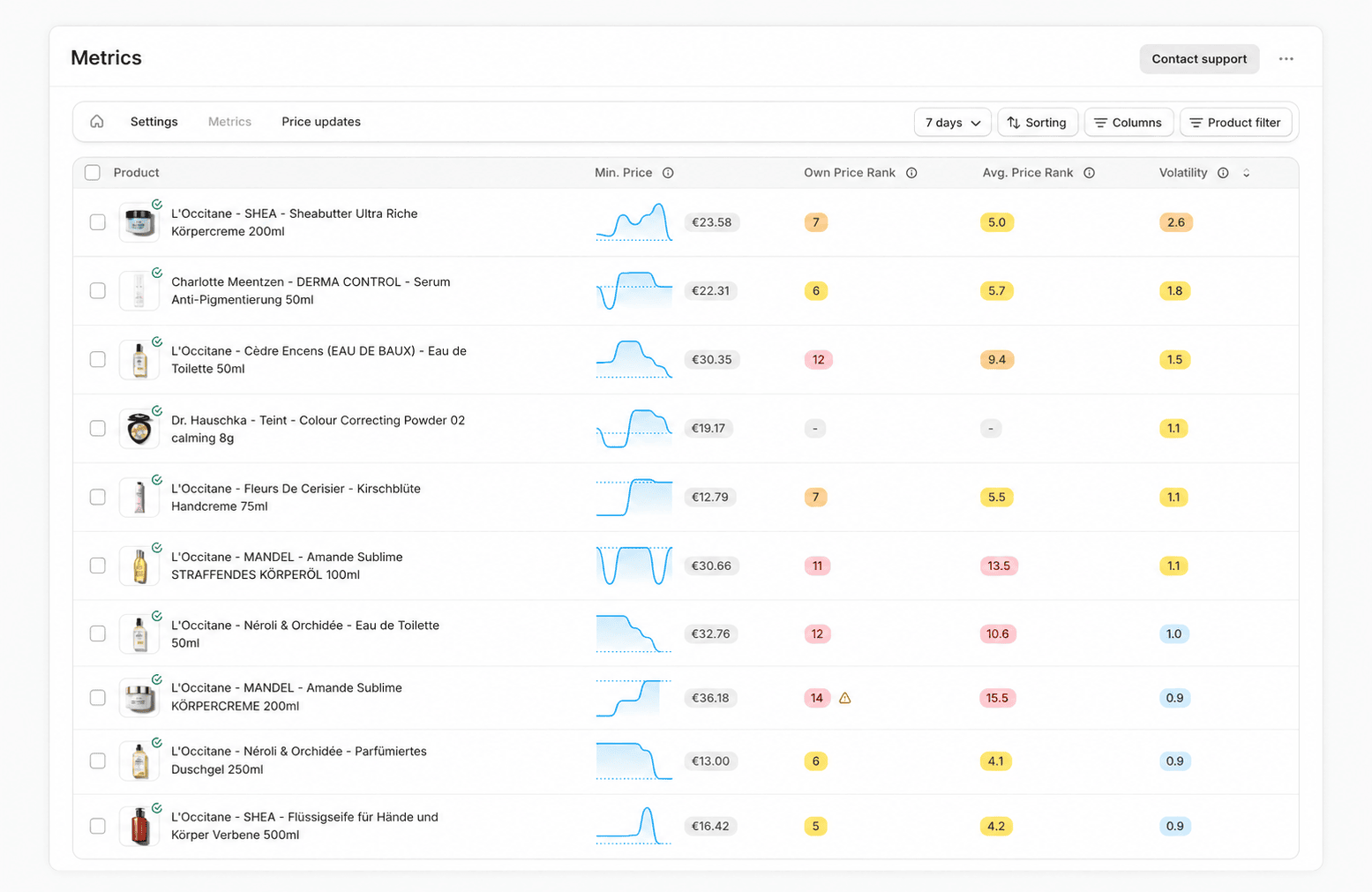 One detail matters more than most tools admit: the bare item price and the **total price including shipping** are two different things — and they produce different ranks. PricePirate therefore tracks the [item price and the total price](/docs/en/guide/concepts/total-price) separately, each with its own rank.
## Price monitoring software that scales with your catalog
Instead of opening listings every day, you define once what gets watched:
* **Syncs per listing** — measure contested products more often and stable ones less often. That keeps data fresh where it matters and costs down where it does not.
* **Time windows and boost phases** — measurements spread across the day, and you can densify them during the hours that matter.
* **Price volatility** — PricePirate estimates, per listing, how often the cheapest price changes per day, so you can spot the products that need attention.
## Competitor prices and positions, answered
Monitoring exists to answer the questions behind your pricing decisions:
* **Where do I stand?** Your own price rank and total-price rank per product — current and averaged over the period.
* **How often am I the cheapest?** The share of measurements where your offer was in front — by item price and by total price.
* **Who moves the market?** The [competitor reports](/docs/en/guide/reports/competitors) show which shops set the pace on your listings.
* **How restless is the listing?** [Price volatility](/docs/en/guide/insights/volatility) flags products with heavy price movement.
One detail matters more than most tools admit: the bare item price and the **total price including shipping** are two different things — and they produce different ranks. PricePirate therefore tracks the [item price and the total price](/docs/en/guide/concepts/total-price) separately, each with its own rank.
## Price monitoring software that scales with your catalog
Instead of opening listings every day, you define once what gets watched:
* **Syncs per listing** — measure contested products more often and stable ones less often. That keeps data fresh where it matters and costs down where it does not.
* **Time windows and boost phases** — measurements spread across the day, and you can densify them during the hours that matter.
* **Price volatility** — PricePirate estimates, per listing, how often the cheapest price changes per day, so you can spot the products that need attention.
## Competitor prices and positions, answered
Monitoring exists to answer the questions behind your pricing decisions:
* **Where do I stand?** Your own price rank and total-price rank per product — current and averaged over the period.
* **How often am I the cheapest?** The share of measurements where your offer was in front — by item price and by total price.
* **Who moves the market?** The [competitor reports](/docs/en/guide/reports/competitors) show which shops set the pace on your listings.
* **How restless is the listing?** [Price volatility](/docs/en/guide/insights/volatility) flags products with heavy price movement.
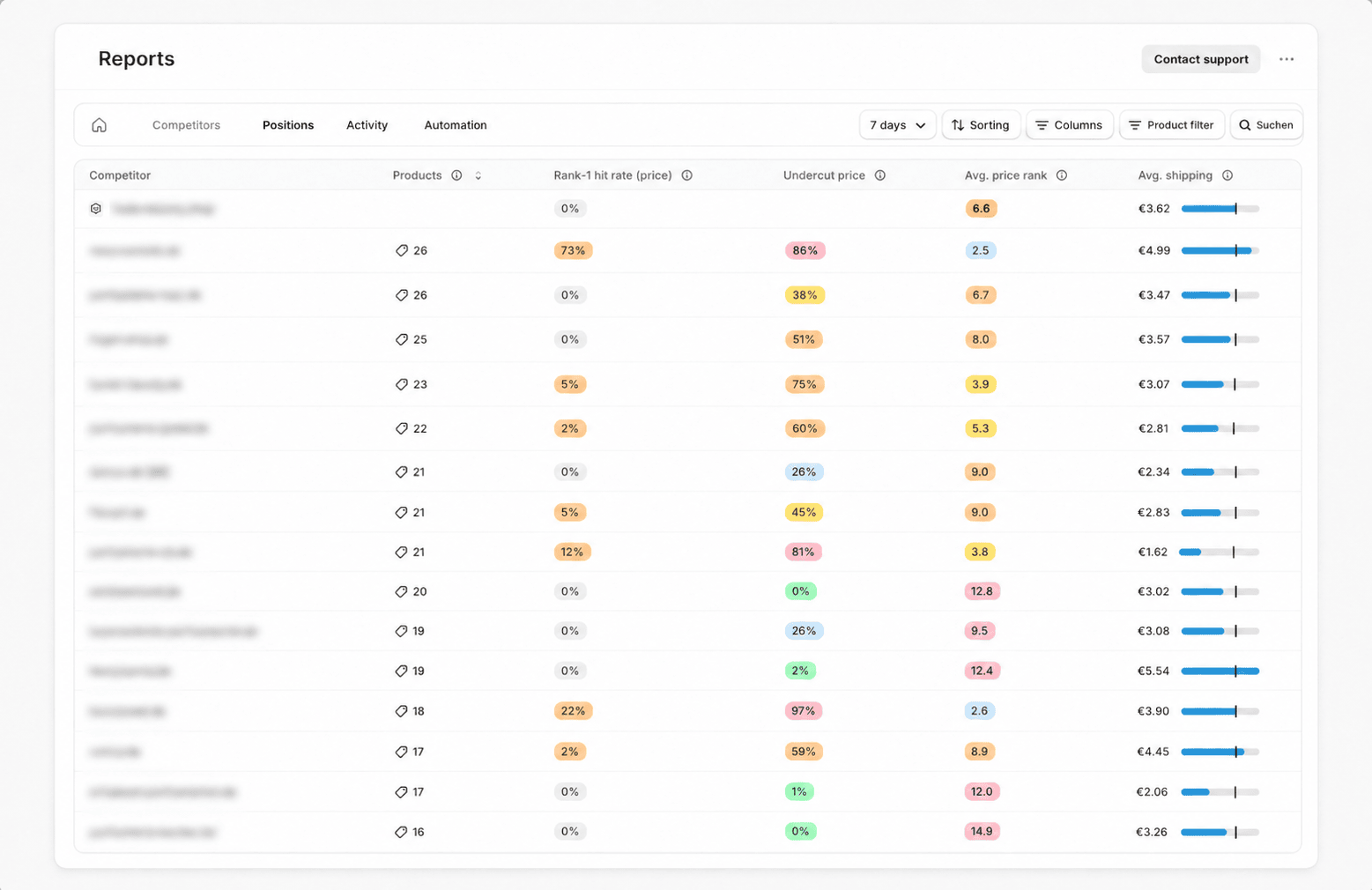 In the [detail view](/docs/en/guide/insights/metrics-details), you can follow each product's price and rank history over time.
## Ecommerce price monitoring across channels
Comparison sites differ in sorting, shipping rules, and competitor sets. PricePirate keeps the metrics comparable: the same ranks, the same total-price logic, and the same reports per product and marketplace. Teams that want the raw data in their own systems can pull Idealo, Klarna, Google Shopping, and more through the [Price Data API](/docs/en/solutions/price-data-api).
## From monitoring to automation
Price monitoring tells you **what** is happening. The next step is reacting automatically: a pricing strategy turns the monitored competitor offers into price suggestions — bounded by a minimum price and further guardrails. The same data you watch today then drives your repricing.
See how that works under [repricing software](/docs/en/solutions/repricing-software).
## FAQ
PricePirate specializes in price comparison sites, first and foremost Idealo. We confirm the right markets for your store during setup.
You control that per listing via daily syncs. Contested products can be measured several times a day, stable ones less often.
Yes. PricePirate records item price, shipping cost, and total price for every offer — with separate ranks by price and by total price.
Idealo is the primary monitoring channel in the app. For Google Shopping and further sources, the [Price Data API](/docs/en/solutions/price-data-api) provides price lookups for your own systems.
Pricing depends on the number of monitored products and the measurement frequency. You can find the current plans on the [pricing page](https://pricepirate.com/en#pricing).
Tell us your products and marketplaces. We will show you the right setup.
## Next steps in the guide
* [Read product metrics](/docs/en/guide/insights/metrics)
* [Connect listings](/docs/en/guide/catalog/connect-listings)
* [Sync settings](/docs/en/guide/automation/syncs)
* [Repricing software: react to price changes automatically](/docs/en/solutions/repricing-software)
In the [detail view](/docs/en/guide/insights/metrics-details), you can follow each product's price and rank history over time.
## Ecommerce price monitoring across channels
Comparison sites differ in sorting, shipping rules, and competitor sets. PricePirate keeps the metrics comparable: the same ranks, the same total-price logic, and the same reports per product and marketplace. Teams that want the raw data in their own systems can pull Idealo, Klarna, Google Shopping, and more through the [Price Data API](/docs/en/solutions/price-data-api).
## From monitoring to automation
Price monitoring tells you **what** is happening. The next step is reacting automatically: a pricing strategy turns the monitored competitor offers into price suggestions — bounded by a minimum price and further guardrails. The same data you watch today then drives your repricing.
See how that works under [repricing software](/docs/en/solutions/repricing-software).
## FAQ
PricePirate specializes in price comparison sites, first and foremost Idealo. We confirm the right markets for your store during setup.
You control that per listing via daily syncs. Contested products can be measured several times a day, stable ones less often.
Yes. PricePirate records item price, shipping cost, and total price for every offer — with separate ranks by price and by total price.
Idealo is the primary monitoring channel in the app. For Google Shopping and further sources, the [Price Data API](/docs/en/solutions/price-data-api) provides price lookups for your own systems.
Pricing depends on the number of monitored products and the measurement frequency. You can find the current plans on the [pricing page](https://pricepirate.com/en#pricing).
Tell us your products and marketplaces. We will show you the right setup.
## Next steps in the guide
* [Read product metrics](/docs/en/guide/insights/metrics)
* [Connect listings](/docs/en/guide/catalog/connect-listings)
* [Sync settings](/docs/en/guide/automation/syncs)
* [Repricing software: react to price changes automatically](/docs/en/solutions/repricing-software)