> ## Documentation Index
> Fetch the complete documentation index at: https://pricepirate.com/docs/llms.txt
> Use this file to discover all available pages before exploring further.
# Repricing Software for Shopify Merchants
> Repricing software for Shopify: monitor competitor prices on comparison shopping sites, automate pricing strategies with guardrails, and update prices in Shopify.
Repricing software adjusts your selling prices automatically as the competition moves. PricePirate does this for Shopify merchants on price comparison sites such as Idealo: it monitors competitor offers, calculates price suggestions from your rules, and writes approved price changes straight to your Shopify store.
Start with the lead form. We will follow up with the next steps for your store.
## Why manual repricing does not scale
On comparison shopping sites, your price position decides your visibility and clicks. Competitors change prices several times a day. If you check prices by hand and update Shopify manually, you always react too late — and either give away margin (price lower than needed) or visibility (price too high for a front position).
## How it works
You connect your Shopify products to the matching marketplace listings — by EAN/GTIN, URL, or search. PricePirate then measures each listing on a regular schedule and records every competitor offer with its price, shipping cost, and total price.
Per variant, you pick a strategy — match the cheapest competitor or undercut them by a fixed amount. Minimum price, shipping costs, and further guardrails are configured in the same dialog.
After each calculation run, PricePirate creates pending price changes. You review them manually — or enable auto-apply once your strategy and limits are tested.
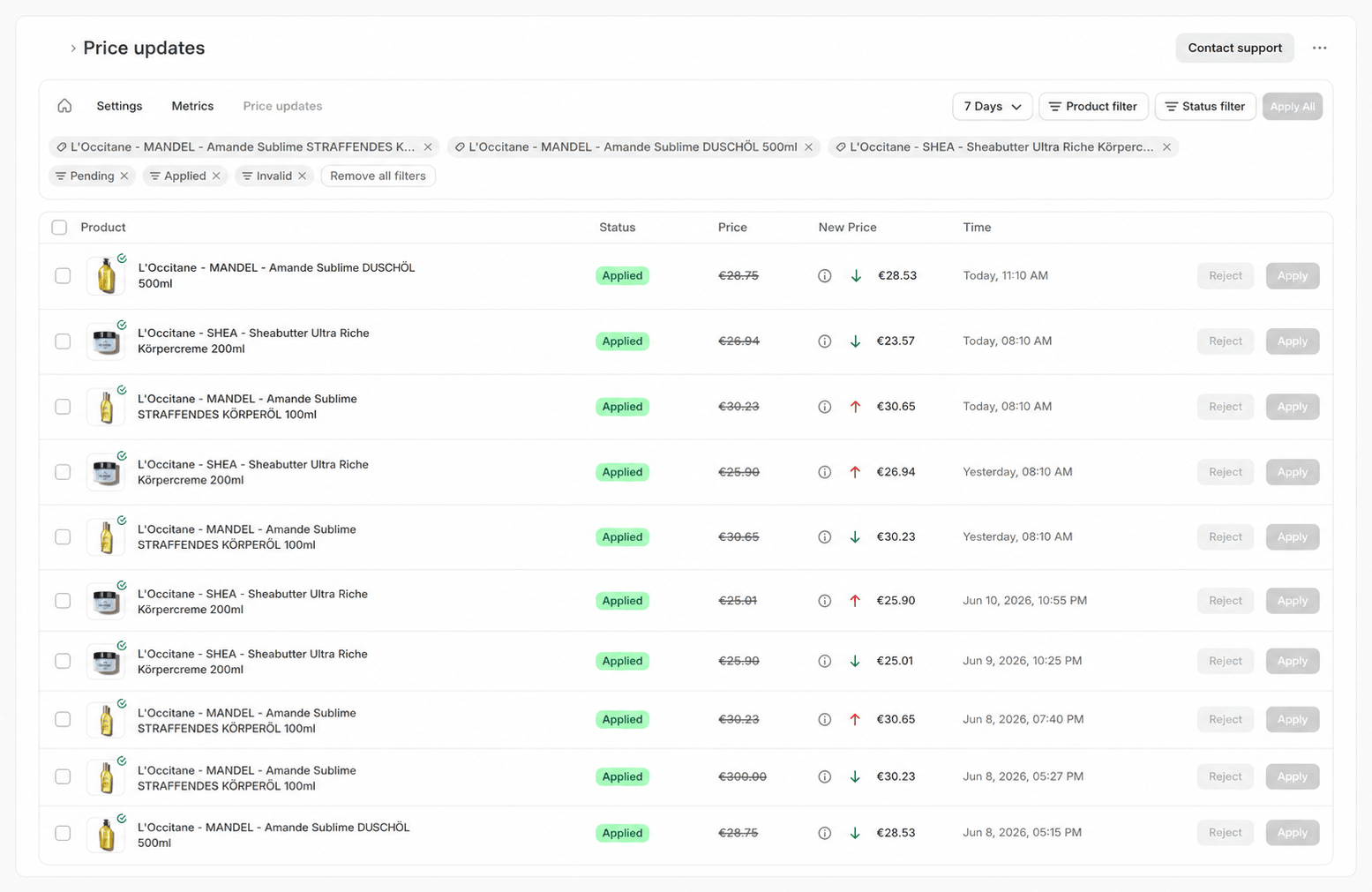 Accepted changes are written directly to your Shopify products. From there, the new prices flow through your existing feed into channels like Idealo.
## Automated repricing with guardrails
Good repricing software never lowers prices blindly. PricePirate combines competitor-based strategies with guardrails that keep every automated price change under control:
* **Match the cheapest** — your price follows the cheapest matching competitor without undercutting it. You stay competitive without starting a price war.
* **Beat the cheapest** — your price undercuts the cheapest competitor by a fixed amount to take the top position deliberately.
* **Minimum price or minimum margin** — set the price floor as a fixed value, or let PricePirate calculate it from your costs and target margin. It is never crossed.
* **Maximum price and minimum stock** — the ceiling caps upward moves, and low inventory pauses price changes.
* **Compete on total price** — strategies can compare against the total price including shipping, because many comparison sites sort by it.
Save proven configurations as [templates](/docs/en/guide/pricing/templates) and [test every strategy](/docs/en/guide/pricing/test) against live listing data before activating it.
## What to look for in a repricing tool
Repricer, repricing tool, automated repricing — the labels vary, but three questions separate useful tools from black boxes:
1. **Where does the competitor data come from?** PricePirate measures connected marketplace listings on your schedule and records price, shipping, and total price for every offer.
2. **How is the price calculated?** Through transparent, competitor-based rules — you can test a strategy and see exactly which price it would suggest before it ever goes live.
3. **Where does the new price go?** Straight into your Shopify store — no CSV exports, no manual copying.
## Which marketplaces does it cover?
PricePirate specializes in **price comparison sites** — first and foremost **Idealo**, the leading comparison platform in the German-speaking market. If you sell into Germany or Austria, see [Idealo repricing](/docs/en/solutions/idealo-repricing) for the channel deep-dive.
## Integration: Shopify
PricePirate is a Shopify app. You install it in your store, connect your products, and keep full control: every price change is logged, and auto-apply can be switched off at any time. No middleware, no separate ERP integration required.
## FAQ
PricePirate pricing depends on the number of monitored products and the sync frequency. You can find the current plans on the [pricing page](https://pricepirate.com/en#pricing).
Repricing reacts to competitor prices: your price follows defined rules relative to the market. Dynamic pricing is the umbrella term for any automated price adjustment — including demand, inventory, or time-based pricing. See [dynamic pricing software](/docs/en/solutions/dynamic-pricing).
Not yet. PricePirate is currently a Shopify app and writes price changes directly to Shopify products. More shop systems are planned: pick your system in the [get-started form](https://pricepirate.com/en/get-started) to join the waitlist.
PricePirate measures every connected listing several times a day — you set the frequency per listing. After each measurement, your strategy calculates a new suggestion, which is written to Shopify immediately when auto-apply is on.
Describe your products and marketplaces. We will show you how PricePirate maps your pricing logic.
## Next steps in the guide
* [Set up pricing strategies](/docs/en/guide/pricing/strategies)
* [Strategy settings and guardrails](/docs/en/guide/pricing/settings)
* [Auto-apply price changes](/docs/en/guide/price-changes/auto-apply)
* [Connect listings](/docs/en/guide/catalog/connect-listings)
Accepted changes are written directly to your Shopify products. From there, the new prices flow through your existing feed into channels like Idealo.
## Automated repricing with guardrails
Good repricing software never lowers prices blindly. PricePirate combines competitor-based strategies with guardrails that keep every automated price change under control:
* **Match the cheapest** — your price follows the cheapest matching competitor without undercutting it. You stay competitive without starting a price war.
* **Beat the cheapest** — your price undercuts the cheapest competitor by a fixed amount to take the top position deliberately.
* **Minimum price or minimum margin** — set the price floor as a fixed value, or let PricePirate calculate it from your costs and target margin. It is never crossed.
* **Maximum price and minimum stock** — the ceiling caps upward moves, and low inventory pauses price changes.
* **Compete on total price** — strategies can compare against the total price including shipping, because many comparison sites sort by it.
Save proven configurations as [templates](/docs/en/guide/pricing/templates) and [test every strategy](/docs/en/guide/pricing/test) against live listing data before activating it.
## What to look for in a repricing tool
Repricer, repricing tool, automated repricing — the labels vary, but three questions separate useful tools from black boxes:
1. **Where does the competitor data come from?** PricePirate measures connected marketplace listings on your schedule and records price, shipping, and total price for every offer.
2. **How is the price calculated?** Through transparent, competitor-based rules — you can test a strategy and see exactly which price it would suggest before it ever goes live.
3. **Where does the new price go?** Straight into your Shopify store — no CSV exports, no manual copying.
## Which marketplaces does it cover?
PricePirate specializes in **price comparison sites** — first and foremost **Idealo**, the leading comparison platform in the German-speaking market. If you sell into Germany or Austria, see [Idealo repricing](/docs/en/solutions/idealo-repricing) for the channel deep-dive.
## Integration: Shopify
PricePirate is a Shopify app. You install it in your store, connect your products, and keep full control: every price change is logged, and auto-apply can be switched off at any time. No middleware, no separate ERP integration required.
## FAQ
PricePirate pricing depends on the number of monitored products and the sync frequency. You can find the current plans on the [pricing page](https://pricepirate.com/en#pricing).
Repricing reacts to competitor prices: your price follows defined rules relative to the market. Dynamic pricing is the umbrella term for any automated price adjustment — including demand, inventory, or time-based pricing. See [dynamic pricing software](/docs/en/solutions/dynamic-pricing).
Not yet. PricePirate is currently a Shopify app and writes price changes directly to Shopify products. More shop systems are planned: pick your system in the [get-started form](https://pricepirate.com/en/get-started) to join the waitlist.
PricePirate measures every connected listing several times a day — you set the frequency per listing. After each measurement, your strategy calculates a new suggestion, which is written to Shopify immediately when auto-apply is on.
Describe your products and marketplaces. We will show you how PricePirate maps your pricing logic.
## Next steps in the guide
* [Set up pricing strategies](/docs/en/guide/pricing/strategies)
* [Strategy settings and guardrails](/docs/en/guide/pricing/settings)
* [Auto-apply price changes](/docs/en/guide/price-changes/auto-apply)
* [Connect listings](/docs/en/guide/catalog/connect-listings)