
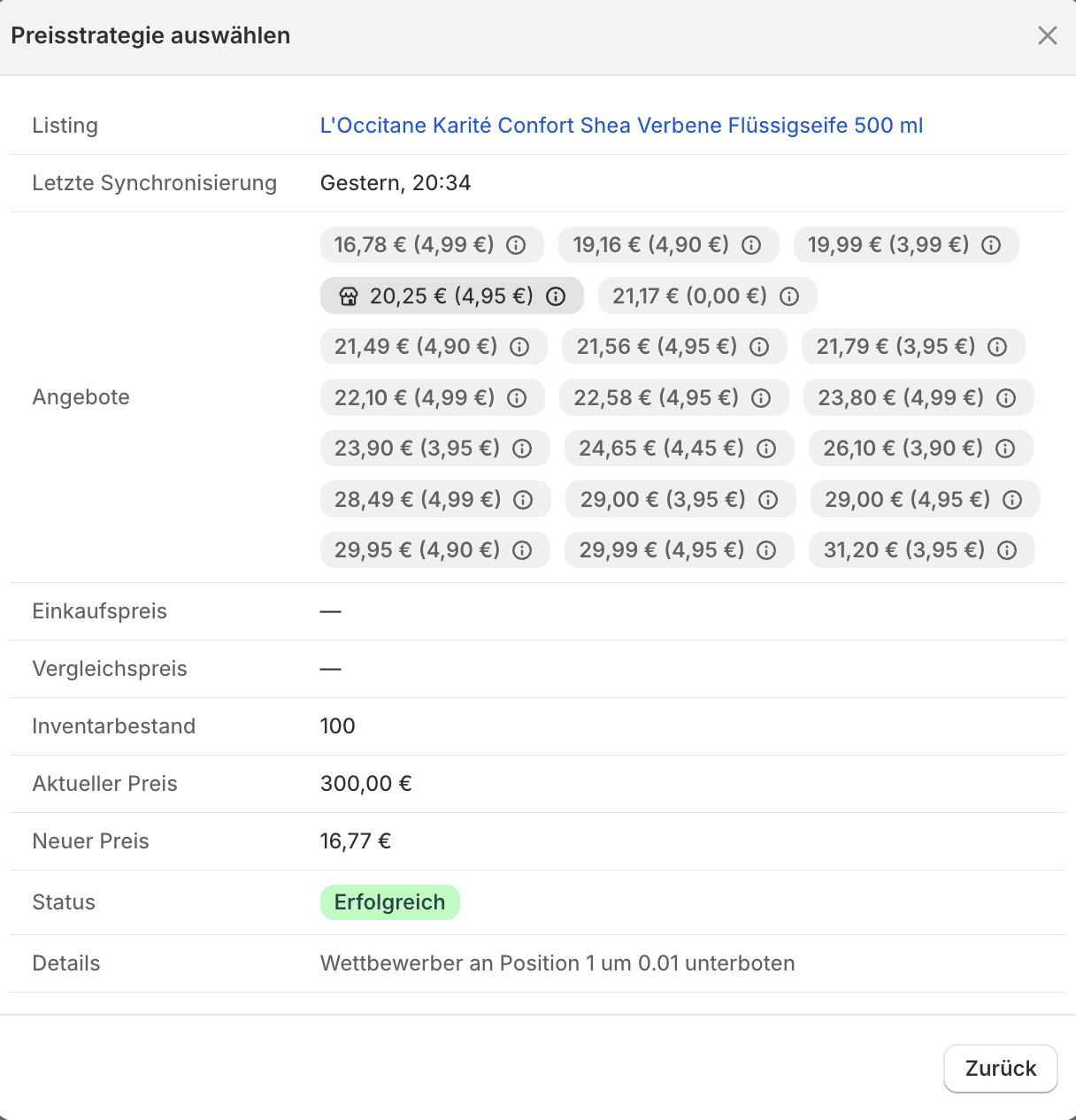
A strategy test result
Reading the result
- Listing – the connected Idealo listing the test runs against.
- Last Synchronization – the time of the market data the test is based on.
- Offers – the individual competitor offers as product price with shipping cost in parentheses. Your own offer is marked with a shop icon and is excluded from the calculation.
- Purchase Price – the variant’s stored purchase price, if available.
- Compare at Price – the variant’s compare-at price (the basis for the optional fallback).
- Inventory Stock – the currently known stock level.
- Current price – your current selling price.
- New price – the price the strategy calculated.
- Status –
Successwhen a valid new price was calculated. If no price is proposed, the current price stays;Errormeans no suggestion could be created (e.g. no competitors, or stock below the minimum stock quantity). - Details – the reasoning behind the result.
The text under Details depends on the selected strategy. “Match The Cheapest” reports, for example, “Matched competitor at position 1”, while “Beat The Cheapest” reports “Undercut competitor at position 1 by 0.01” (as in the screenshot above).
Check
- suggested price and expected position
- minimum price and maximum price
- margin and shipping costs
- current listing data from the last sync